Want to generate publication-quality figure panels for your research articles?
Designing clear, aesthetically pleasing, and journal-ready figures is one of the most critical yet time-consuming tasks in scientific publishing. Whether you need to arrange multi-panel subplots, maintain uniform font sizes, configure dual or broken Y-axes, or neatly place subfigure labels ((a), (b), (c)…), writing Matplotlib code from scratch often involves tedious trial and error.
To streamline this workflow, I created and shared a modular collection of ready-to-use Matplotlib figure templates in my GitHub repository [figure-template]. These templates provide standardized blueprints for creating publication-standard figures—including bar plots with error bars, multi-dataset line plots, distribution histograms, dual-axis and broken-axis layouts, and composite multi-panel figure panels.
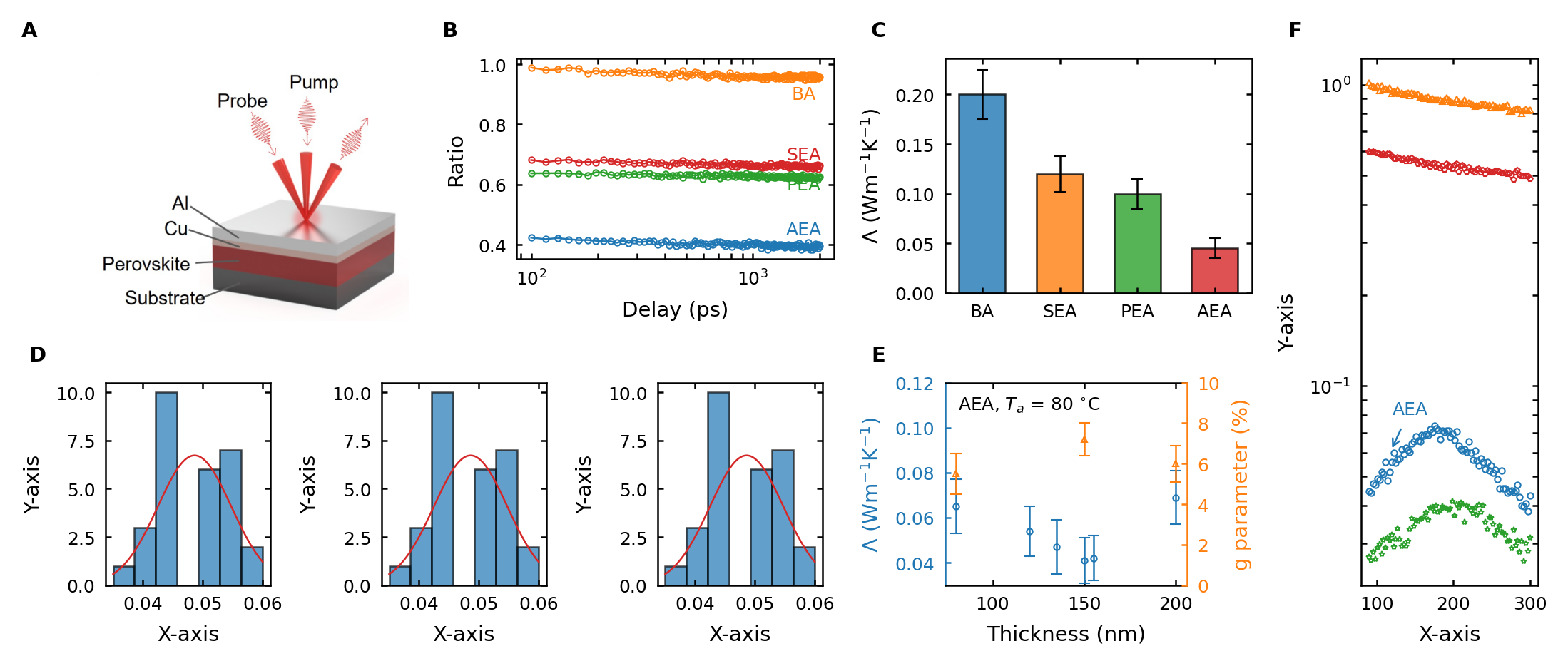
Figure: Sample multi-panel journal figure created with this Matplotlib template suite, demonstrating subplot alignment, error bars, dual axes, and publication-standard typography.
You can run these templates interactively in Google Colab with a single click without installing anything, or clone the repository to work locally in VS Code or Jupyter Notebook.
🚀 Quick Start: Open in Google Colab
Click any link below to launch the templates directly in Google Colab — no local setup or package installation needed:
- 📖 Figure Templates Library — 🔵 Open in Colab: Comprehensive template library covering all individual plot types (line plots, histograms, error bars, dual-axis, shared-axis, broken-axis).
- 🎨 Demo Multi-Panel Figure — 🔵 Open in Colab: Working example demonstrating how to combine multiple subplots into a cohesive figure panel.
- 📊 Real Publication Example — 🔵 Open in Colab: A complete figure panel replicated from a peer-reviewed research article.
📋 Supported Plot Types & Purpose
This template suite provides clean, pre-styled blueprints designed to meet academic journal standards:
- Bar plots: with error bars and customizable styling
- Line plots: with multiple datasets and fitted curves
- Histograms: for distribution visualization
- Multi-panel figures: combining multiple plot types into one cohesive layout
- Dual-axis plots: single X-axis with secondary Y-axes
- Shared-axis plots: multiple subplots sharing axes for compact presentation
- Broken Y-axis plots: handling datasets with large value ranges or discontinuities
All templates feature publication-grade typography, standardized tick parameters, and high-resolution export settings.
📖 How to Use the Templates
Option 1: Google Colab (Recommended — No Installation)
- Create a notebook in Google Colab: Navigate to colab.research.google.com and click New notebook.
- Mount Google Drive (optional, to access your data files):
from google.colab import drive drive.mount('/content/drive') - Upload your data files: Upload your CSV or data files via Colab’s file browser or organize them in Google Drive.
- Copy and adapt the template: Open the Figure Templates Notebook, copy the relevant code into your notebook, and update data paths and labels.
- Run and export: Execute the cells and save your output figure using
plt.savefig()as a high-resolution PNG or vector PDF.
Option 2: Local Installation (For Jupyter / VS Code)
Prerequisites: Python 3.7+, matplotlib, numpy, and Jupyter Notebook or VS Code.
- Clone or Download the Repository:
- Using Git:
git clone https://github.com/zarifrazin/figure-template.git cd figure-template - Direct Download: Download the ZIP archive from GitHub, extract it, and open the folder in your editor.
- Using Git:
- Open the Notebooks: Explore
template/figure_templates.ipynbfor individual plot templates andtemplate/demo_figure_panel.ipynbfor multi-panel assembly. - Customize with Your Data: Point to your data files, adjust labels, colors, and styles according to your journal’s author guidelines.
- Save High-Resolution Output: Run the notebook and export vector PDFs or 300+ DPI images for submission.
📊 Repository Structure
template/                          # Template notebooks and sample data
├── figure_templates.ipynb         # Main template library with all plot types
├── demo_figure_panel.ipynb        # Complete example combining multiple figures
├── BarPlot/                       # Bar plot example data
├── LinePlot/                      # Line plot example data
├── singleXsingleY/                # Single-axis plot templates
│   ├── ErrorBar/                  # Error bar data
│   └── Histogram/                 # Histogram data
├── singleXdoubleY/                # Dual Y-axis plot data
├── breakY/                        # Broken Y-axis plot data
└── sharedX/                       # Shared X-axis plot data

Example/                           # Real research figure examples
├── example_figure_panel.ipynb     # Publication figure panel workflow
├── FigureA/ - FigureF/            # Subplot datasets and images
└── aee5269_Figure_fig2_seq2_v2.jpg # Final published output
📬 Contact & Attribution
Developed at the Nanoscale Heat Transfer Lab, North Carolina State University.
For questions, suggestions, or custom templates, feel free to open an issue on the GitHub repository or contact the author.
Happy plotting! 📈